
Create a DOS Bootable USB
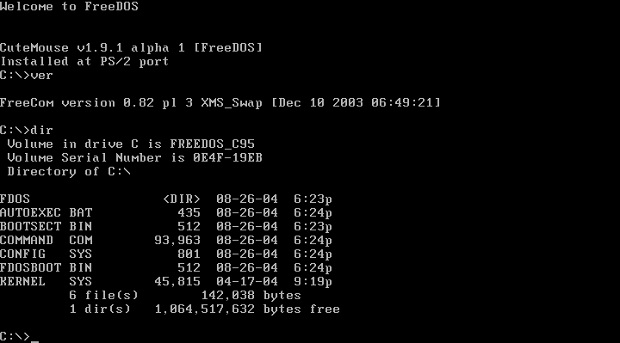
“How do I create a DOS bootable USB?” is one of the most frequent questions our OnLogic support team hears. Even on modern computers, it is still sometimes necessary to boot into MS-DOS for administrative and maintenance tasks. The simplicity of DOS provides a platform that is easy to code for when low level hardware access is needed. Firmware updates for the BIOS and expansion cards are still commonly done through DOS. Our technical support website, linked below, has a simple tutorial for booting into DOS from a USB flash drive.
Note – the term “BIOS” commonly refers to both BIOS and UEFI architectures. Check our blog about UEFI vs. BIOS to learn more about the key differences between a BIOS and a UEFI.
What is a BIOS?
The basic input/output system (BIOS) is an integral part of your PC. In simplest terms, in order for your computer to boot up, it needs instructions. BIOS stores these instructions. It detects and initializes devices at startup and accesses the master boot record (MBR) on the hard drive to start the boot process.
Creating the DOS bootable USB
Our support team has written a thorough step by step guide on how to create a DOS bootable USB. Check it out!
Booting to the USB Drive
Once you have created your bootable DOS USB key, you can insert it into your PC and turn on your computer. Go into the BIOS (typically F2/Del/ESC) and select the USB drive as the first boot device. On newer systems, you might have to enable CSM / legacy boot mode.
Once you complete all the steps correctly, you arrive at a familiar DOS command prompt. From here you can update your BIOS, make system disk fixes, run your low level utilities and more.
The original post date of this blog was November 3, 2008. We updated the content on January 3, 2022.
Get the Latest Tech Updates
Subscribe to our newsletters to get updates from OnLogic delivered straight to your inbox. News and insights from our team of experts are just a click away. Hit the button to head to our subscription page.
Share
About the Author: Nathan Schramm

More Articles
OnLogic Industrial Computers
Discover OnLogic's multitude of industrial computers that will help you to advance your IoT project


Learn more at OnLogic.com
OnLogic Industrial PCs: Designed to last. Built to order. Delivered in days. Visit our online store at OnLogic.com
